Skip to content
  • Home
  • Blogs
  • IT Services – Renton, WA
    • Computer Repairs
    • Operating System Services
    • Computer & Software Training
    • Web Hosting & Email Services
    • IT Managed Services
    • Storage Devices & Hard Drive Services
    • Data Recovery & Destruction
    • Accessories Installation & Configuration
    • Network Installation & Configuration
    • Video Production & Training Services
    • Social Media Management
  • Contact Information
  • Privacy Policy
  • Computer HardWare Store
    • External Storage Device Enclosures
      • NVMe Enclosures
      • 2.5″ External Storage Enclosures
    • Computer Diagnostic Tools
    • Computer Accessories
      • Computer Accessories – Mouse
      • Computer Accessories – KeyBoards
      • Computer Accessories – Headphones
      • Computer Accessories – USB Hubs
October 2, 2026

                     The Computer Experts. If we don't fix it, you don't pay for it.

  • Home
  • Blogs
  • IT Services – Renton, WA
    • Computer Repairs
    • Operating System Services
    • Computer & Software Training
    • Web Hosting & Email Services
    • IT Managed Services
    • Storage Devices & Hard Drive Services
    • Data Recovery & Destruction
    • Accessories Installation & Configuration
    • Network Installation & Configuration
    • Video Production & Training Services
    • Social Media Management
  • Contact Information
  • Privacy Policy
  • Computer HardWare Store
    • External Storage Device Enclosures
      • NVMe Enclosures
      • 2.5″ External Storage Enclosures
    • Computer Diagnostic Tools
    • Computer Accessories
      • Computer Accessories – Mouse
      • Computer Accessories – KeyBoards
      • Computer Accessories – Headphones
      • Computer Accessories – USB Hubs

Computer Diagnostic Tools

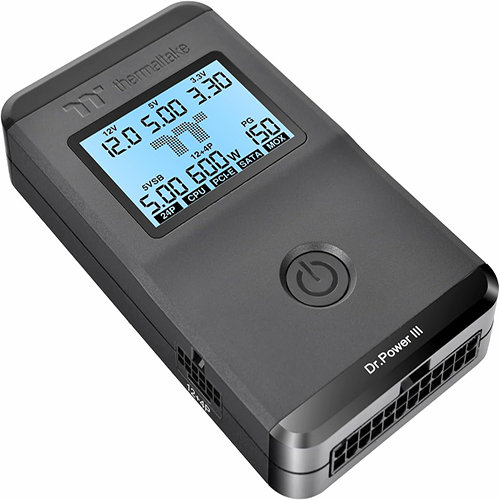
The image displays a Thermaltake Dr. Power III power supply tester.

The picture features a dark gray, rectangular electronic device, likely a power supply tester, presented from an elevated, slightly angled perspective. The device has a matte finish and rounded edges, giving it a sleek and modern appearance. The top surface is dominated by a digital display panel with a light blue background. This screen shows various electrical readings and labels, including "12V", "5VSB", "3.3V", "24P", "12-4P", "5.00", "3.30", "600w", "PG", and "150". There are also labels like "CPU", "PCI-E", "SATA", and "MOX", indicating different power outputs or components being monitored. Prominently displayed in the center of the screen is a stylized "TT" logo. Below the screen, on the same top surface, is a circular power button with a standard power symbol icon. Towards the front right of the device, the branding "Dr.Power III" is clearly visible. On the left side edge of the device, a connector labeled "12+4P" is visible. On the right side edge, a grid of ventilation slots is present. The overall atmosphere is technical and precise, conveying a sense of utility and diagnostic capability, with a clean and functional aesthetic.

Thermaltake Dr. Power III Pro; ATX Power Supply Tester

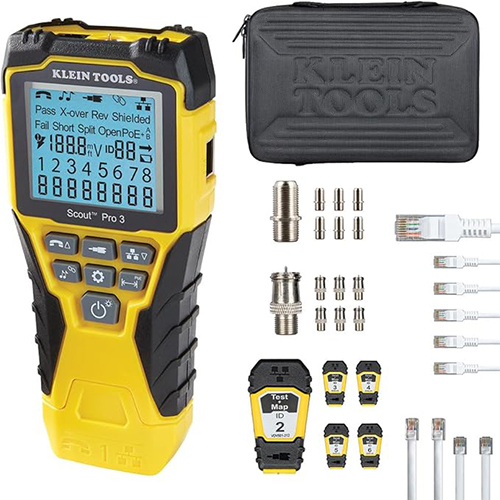
This image displays a Klein Tools Scout Pro 3 tester and its accompanying accessories for network cable testing.

The main object in the image is a bright yellow and black handheld network cable tester, identified as "Klein Tools Scout Pro 3" on its digital display. The screen shows various diagnostic readings, including "Pass X-over Rev Shielded," "Fail Short Split Open PoE+," and a numerical display of voltage (188.8mV) and IDs (ID 88). Below the screen are several buttons with icons representing different functions like phone, network cable, power, and settings. The tester has a rugged, ergonomic design. To the right of the tester, there is a black zippered carrying case with the "KLEIN TOOLS" logo embossed on it. Below the case are various accessories. There are two types of coaxial cable connectors, one with a larger knurled body and the other with a smaller, more intricate design. Next to these are several smaller, cylindrical metal adapters, likely for different types of cable connections. Further to the right, a white network cable with an RJ45 connector is partially visible, and below it are several more white cables with RJ45 connectors, arranged in a neat row. Towards the bottom right, there are three more white cables with RJ45 connectors. At the bottom center of the accessories section is a yellow and black device labeled "Test Map ID 2." Beside this are six small, yellow and black remote units, each with a number (ID 4, ID 5, ID 6) and two connection ports. The overall atmosphere of the image is professional and organized, suggesting a focus on functionality and diagnostic capability, typical of tools designed for electrical and network technicians.

Klein Tools VDV501-853 Coaxial Cable Tester, Scout Pro 3 with Test-n-Map Remote, Includes Remotes #2 – #6, Tests Voice, Data and Video Cable


BACK

Recent Posts

  • What are servers?
  • How to connect to a Cisco device Via console cable?
  • Is Quick Assist giving you an Connection Error?
  • What is WordPress?
  • About Us

Recent Comments

No comments to show.

Archives

  • June 2026
  • May 2026

Categories

  • Factoid Of The Day
  • General Tech
  • Horrid Tales of the IT Crypt
  • Joke Of The Day
  • Uncategorized
  • YouTube Videos

Contact Info

Tel:           (206) 899-7331

eMail:       info@compudoctors.com

Location:  Renton, WA

Business Hours

Mon:   10:30AM – 6:00PM

Tue:    10:30AM – 6:00PM

Wed:   10:30AM – 6:00PM

Thu:    10:30AM – 6:00PM

Fri:      10:30AM – 6:00PM

Sat :     By Appointment Only

Sun :    Closed

Service Area

State:                         Washington State

Service Area North Side:

.      Seattle, Shoreline ,

.      Edmonds, Mercer Island,

.      Bellevue, Kirkland,

.      Redmond, Bothel,

.      WoodenVille,

.      Lynwood, Everett

Service Area South Side:

.      Renton, Kent, Auburn

.      Sumner, Puyallup

Copyright © 2026

Design by ThemesDNA.com